🍏 I ported my Vulkan game engine to macOS in one day
A friend lent me his MacBook for the month, and I took advantage of this opportunity to port the game engine I wrote for my roguelike deckbuilder Now You’re Cooking! to aarch64 and x86_64 macOS.
I wrote the game engine in Zig; the renderer is built on Vulkan using the strategies described Fast, Flexible, and Simple Rendering in Vulkan. The engine libraries are open source although I don’t have a good public example project wiring them all together at the moment.
I was able to get the game running day one of having mac access, and then I spent two additional days cleaning up my build process so that I won't need regular access to a mac in the future. A few weeks later I fixed a bug a user encountered that I elaborate on here.
Deploying builds from a new Linux, Windows, or macOS machine now only requires four steps most of which are just getting the code and toolchain:
- Download Zig, add it to the path
- Download the Steamworks SDK, add it to the path
- Install git, use it to clone the game
- Run
zig build deployfrom the source directory
Zig will then cross compile the game to all target platforms, and upload the results to Steam. The rest of this post details how I got this working, why it was achievable so quickly, and how you can easily get the same results in C/C++.
The Graphics Landscape in 2026
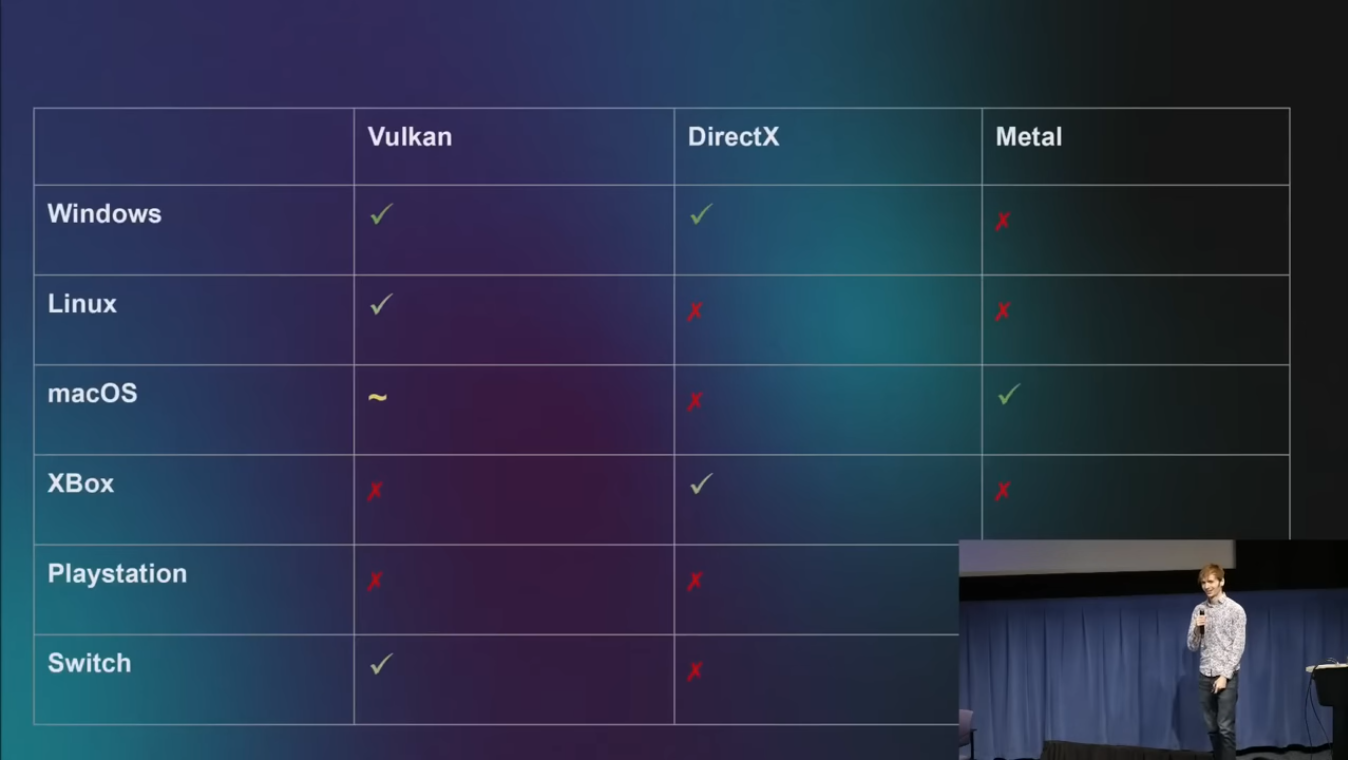
The “modern” graphics landscape is a little weird. There are three main GPU vendors, and three main graphics APIs. You might reasonably assume that there is one API per vendor, but you’d be mistaken.
The hardware is interchangeable, but the APIs are arbitrairly platform locked. DirectX only works on Microsoft platforms, Metal only works on Apple platforms. Often the same GPU supports the alternative API just fine when booted into another OS.
Vulkan is an open standard managed by a non-profit that can theoretically run anywhere, but in an effort that mirrors Microsoft’s behavior last gen, Apple refuses to support it. But wait–if the hardware is the same, all three of these APIs are virtually identical…instead of writing another renderer backend, could we just translate Vulkan calls into Metal?
Enter MoltenVK and KosmicKrisp. MoltenVK is a widely supported non-conformant Vulkan implementation on top of Metal, KosmicKrisp is a conformant Vulkan implementation on top of Metal but you need a more recent Mac to run it.
Supporting Translation Layers

I didn’t realize how easy it would be to support these translation layers until Robbie Lyman showed up to my Windows/Linux-only shader workshop at SYCL with a MacBook and then proceeded to port my starter application to macOS on the spot and PR the relevant change.
To save you a click, the diff is just adding a case to a switch statement to get the native Cocoa window handle from SDL on macOS instead of the Linux/Windows window handle. After that, the little shader playground project ran with no additional tweaks:
.macos => sdl.SDL_GetPointerProperty(
    sdl.SDL_GetWindowProperties(window),
    sdl.SDL_PROP_WINDOW_COCOA_WINDOW_POINTER,
    null,
),
That was good enough for his use case since he had MoltenVK installed on his machine. However, a typical user won’t, so when making my port I have Zig’s build system emit an app bundle with the following form:
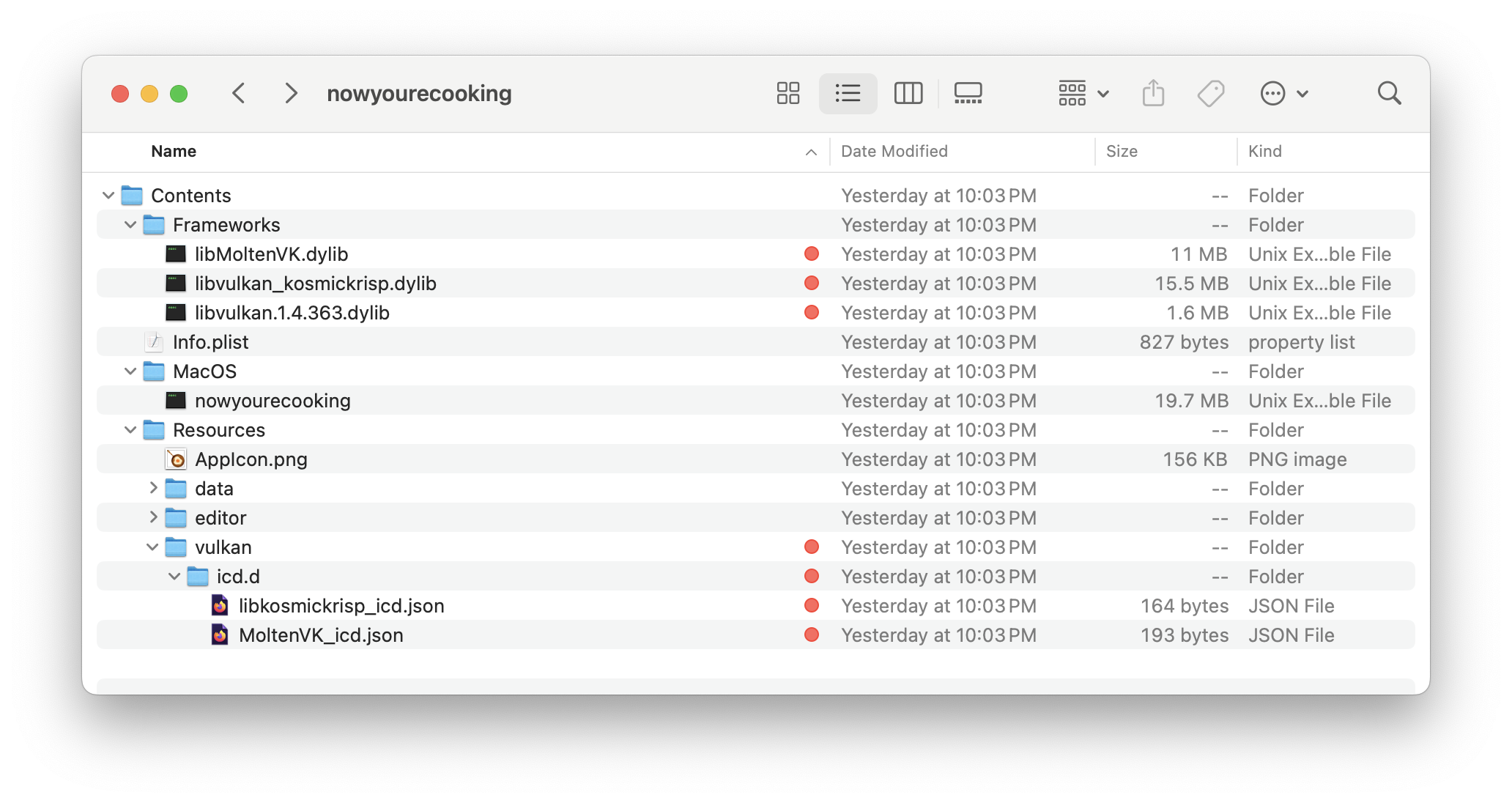
Text Version
- nowyourecooking.app
- Contents
- MacOS
- nowyourecooking (game binary)
- vulkan
- icd.d
- MoltenVK_icd.json
- libkosmickrisp_icd.json
- icd.d
- Resources
- data (game data)
- AppIcon.png
- Frameworks
- libvulkan_kosmickrisp.dylib
- libvulkan.1.4.363.dylib
- libMoltenVK.dylib
- Info.plist
- MacOS
The red/bolded items are from the Vulkan SDK. Note that I had to modify the paths in the ICD to fit the bundle structure as recommended by LunarG here, and I removed/renamed some files to avoid having to ship symlinks.
Then, I told SDL where to find Vulkan:
// If we're running macOS, ask for the bundled libvulkan and let it
// decide whether to offer us MoltenVK, KosmicKrisp, or both.
if (builtin.target.os.tag == .macos) {
    if (!sdl.SDL_SetHint(
        sdl.SDL_HINT_VULKAN_LIBRARY,
        "@executable_path/../Frameworks/libvulkan.1.4.363.dylib",
    )) {
        log.err("SDL_SetHint failed", .{});
    }
}
With this change SDL was able to find Vulkan, but my device selection code was failing to find a supported device. This is because my test machine only supported MoltenVK which is a non-conformant Vulakn implementation, and non-conformant “devices” aren’t listed by default.
The resolution is to request VK_KHR_portability_enumeration if it’s available:
if (instance_exts.khr_portability_enumeration) {
    required_instance_exts.append(
        arena,
        vk.instance_extensions.khr_portability_enumeration.name
    ) catch @panic("OOM");
}
And then, if choosing a “portability” device, ask for VK_KHR_portability_subset:
if (self.khr_portability_subset) {
    result.append(
        gpa,
        vk.device_extensions.khr_portability_subset.name,
    ) catch @panic("OOM");
}
This latter extension will let you query for the particular reasons this implementation isn’t conformant. Rather than do this, I just removed everything from my render hardware abstraction that wasn’t guaranteed to work. The diff was pretty small, you can see it as well as the previously mentioned changes and my device prioritization logic here. Apologies for the typos in the comments that I’m only noticing now.
Info.plist
Here are the docs on the Info.plist format. You don’t need Apple tools to generate it, you can just write it by hand.
Apple loves breaking doc links, apologies if this one is dead by the time you’re reading this. You can only expect so much from a company that thinks you should need an administrator password to paste into vim.
You’ll want to set your minimum macos version in the Info.plist and in Zig to at least 12.0.0, since that’s the minimum version supported by MoltenVK.
Getting The Vulkan SDK
In an ideal world, I would build the Vulkan SDK from source using Zig’s build system like I do all my other dependencies.
However, since I have higher priority tasks and every platform besides macOS provides the Vulkan SDK, I’m just shipping the binaries provided by LunarG. They didn’t make finding them especially easy, as I far as I can tell there’s no tarball you just have to download their installer and then use the CLI instead of the GUI if you don’t want to give the installer root.
If anyone is making an effort to port the Vulkan SDK to Zig’s build system, reach out. Maybe we can add it to allyourcodebase.
Reliability
I’ve only found one bug since shipping, though admittedly I don’t have many people beta testing yet.
MoltenVK uses SPIRV-Cross to translate SPIRV to MSL. SPIRV-Cross translates GLSL.std.450.UnpackUnorm4x8 to Metal’s unpack_unorm4x8_to_float. This sounds reasonable enough, but the former makes precision guarantees, whereas as far as I can tell, the latter doesn’t.
On the x86_64 Macs I’ve tested 0xFF components decode to ~0.99999970197 instead of 1 when using the discrete AMD GPU. This broke one of my shaders that was treating 1 as a special value. Easy enough to work around; just do the comparison on the integer value before unpacking.
I’ve filed an issue suggesting an alternate lowering, I may PR a fix if they agree with my analysis. I haven’t found any bugs that affect more recent Apple hardware running MoltenVK, and I haven’t found any issues on machines that support KosmicKrisp.
Remember that all this tech is open source. If you try it out and run into an issue, you can just patch it!
Cross Compiling SDL

I wrote a custom platform layer for Way of Rhea, but for Now You’re Cooking! I decided to use SDL. Operating system specific windowing code is always really annoying to write, and every operating system I’ve ever targeted loves to change things up and deprecate all the APIs you built your apps on every few years, forcing you to rewrite everything.
I think we’re all better off if we can band together behind projects like SDL and share this unfortunate maintenence burden.
There’s only one issue. I don’t want to have to go and find a Mac every time I want to make a Mac build. SDL’s official build system is CMake, we could try to install a cross compilation toolchain that will work with the CMake build, but this is a pain to do. We could use the SDL provided by Steam, but I want control over the version I link with and the ability to patch it.
Enter Zig. Zig can cross compile Zig, C, and C++ to all the platforms it supports. Ultimately it’s exposing functionality that already exists in LLVM, but making it easy to use.
Back when I started this engine, I ported SDL to Zig’s build system. I didn’t have a Mac to test on at the time so the build only supported Windows and Linux. Thankfully, Garett Bass and Zadock Maloba stepped up to contribute the logic necessary to build on macOS, Nick Macholl and Simone Flici contributed some additional fixes.
I made a few additional changes to make cross compilation to macOS possible once I got my hands on a Mac to grab the macOS SDK from. I can’t publish the macOS SDK Zig package because Apple’s lawyers are cowards, but you can easily follow the instructions in the README.md to grab them yourself.
And that’s it, now we can build SDL for macOS from any platform!
This work is all open source. You’re welcome to take advantage of it in your own projects, your project does not need to be written in Zig to benefit from the Zig build system.
Universal Binaries
In ~2023, Apple stopped shipping x86_64 CPUs in favor of aarch64. However, a lot of x86_64 Macs are still floating around. We can cross compile to either target easily, so ideally we’d just upload both an x86_64 build and an aarch64 build to Steam, and let it figure out which build to download on which machine.
Unfortunately, while Steam lets you upload platform specific builds, and also has support for 32bit vs 64bit builds, it makes no distinction between x86_64 and aarch64 builds.
(Steam also doesn’t distinguish between x86_64 v1, v2, or v3–if you’re reading this Valve, this would be a great feature! You’re probably running a x86_64 v3 CPU right now, wouldn’t you like it if the games you play used it?)
Fortunately, Apple has a solution for this: universal binaries. These are essentially just binaries for different targets glued together. Typically you would generate such a binary using a command line tool provided by Apple called lipo, but we can’t depend on any Apple tools if we’re cross compiling.
Thanksfully building a universal binary is very straightforward. Mat Klad wrote an implementation of lipo here for TigerBeetle, it’s only 81 lines. I based mine off of his code. I have a little command line tool that can merge an x86_64 build and an aarch64 build together, and I have Zig’s build system produce both binaries and then run this tool on them before building the app bundle. I’ll look into whether it makes sense to upstream this into std.Build at some point, but it really is easy to wire up.
Steamworks
It’s an affront to personal computing that Apple requires developers to pay a subscription for the right to ship software on their platform. Don’t pay it. You already paid Valve for your Steam appid, and they took care of it for you–shipping unsigned macOS binaries on Steam “just works”.
My Steamworks setup isn’t macOS specific, but I figured I’d run through it here to illustrate how you can use Zig to deploy builds to multiple platforms on Steam.
If you’re setting up uploading to Steamworks for the first time, I recommend watching the videos linked in the Steamworks SDK docs. Steam’s tooling around this is very powerful, but it’s also messy and has poor error handling. If you try to skip steps you’re in for a bad time.
If you follow Valve’s instructions, you’ll end up with:
- The Steamworks SDK installed somewhere on your system
- Don’t put this in your game’s repo
- Do add
steamcmdto your path, or if on nixOS, a wrapper that invokessteamcmdthroughsteam-run
- One or more VDF files in your game’s repo describing how to deploy builds
You’ll be able to deploy to Steam by building your game into the correct directory and then running:
steamcmd +login $USERNAME \
  +run_app_build abs/path/to/app_build.vdf \
  +quit
This is fine, but deploying this way requires N + 2 steps where N is the number of platforms you’re targeting. First you have to build your game for each platform, and then you have to put all the files somewhere relative to your VDF script, and then you have to run steamcmd.
Instead of going through this process manually, I automate the whole thing with the Zig build
system. I have my build.zig script build the game for all platforms, and then use a
WriteFile step to create the directory structure expected by my VDF in the cache
1 including copying the VDF
script into that directory so that the relative paths in the VDF files are correct.
Then I invoke steamcmd. Note the make_absolute flag, Valve went out of their way to make steamcmd require absolute paths for some reason. I added support for absolute path args to Zig’s build system specifically for this use case. Please don’t abuse it. ¯\(ツ)/¯
const run_app_build_alpha = b.addSystemCommand(&.{"steamcmd"});
run_app_build_alpha.addArgs(&.{ "+login", "$USERNAME" });
run_app_build_alpha.addArg("+run_app_build");
run_app_build_alpha.addFileArg2(
  app_build_vdf.path(b, "app_build.vdf"),
  .{ .make_absolute = true },
);
run_app_build_alpha.addArg("+quit");
And that’s it! Now we can deploy with zig build deploy.
- ^
We deploy from the cache rather than from
zig-outaszig-outaccumulates results, whereas the cache directory we deploy will only contain files from our current build.
Some other tips…
- I preprocess the VDF script to replace
%VERSION%with the result ofgit describe --always --brokento give the build a description in the Steamworks web UI. If this PR is merged by the time you’re reading this then you can use that instead of writing a one-off tool to do this. I also support dry runs this way. - I deploy my game data to a separate depot so that I don’t need to reupload it for every platform, although I am forced to reupload it on macOS as Valve doesn’t appear to provide a way to install depots at a platform dependent location (e.g. inside the resource bundle).
- When running a deploy step, I have the game build depend on a
+loginonly step. This allows Steamworks to cache the credentials so that I can kick off a release build, and then walk away without being prompted for user input again when it finishes.
Takeaway
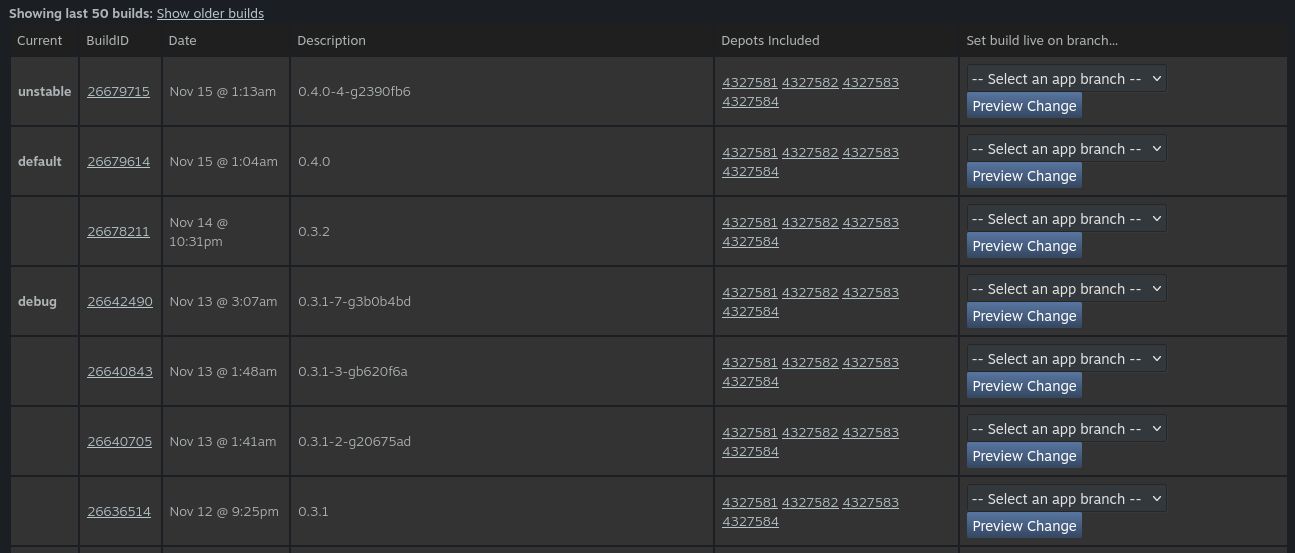

You owe it to yourself to get this stuff right! The easier it is to get new builds in the hands of players, the more often you’ll do it. The more often you get feedback on your builds, the better your game will be.
This post was a bit dense but it took me longer to write it than it did to do the work. If you’re working in Zig, C, or C++, cross compilation may be easier than you think. :)
If you like deck builders, wishlist Now You’re Cooking! on Steam and you’ll get an email when I release the demo!